
Android app · Now on Google Play
Spooky Box, a spirit box-style app for AndroidGhost hunting gear in your pocket.
Turn sensor shifts into spoken words, each logged with its time and reason. Record your session, mark the moments, and replay it from any word.
See what the one-time unlock adds · US$5.99
- Free to download
- No ads
- No account
- No subscription
- Android 8.0 or later
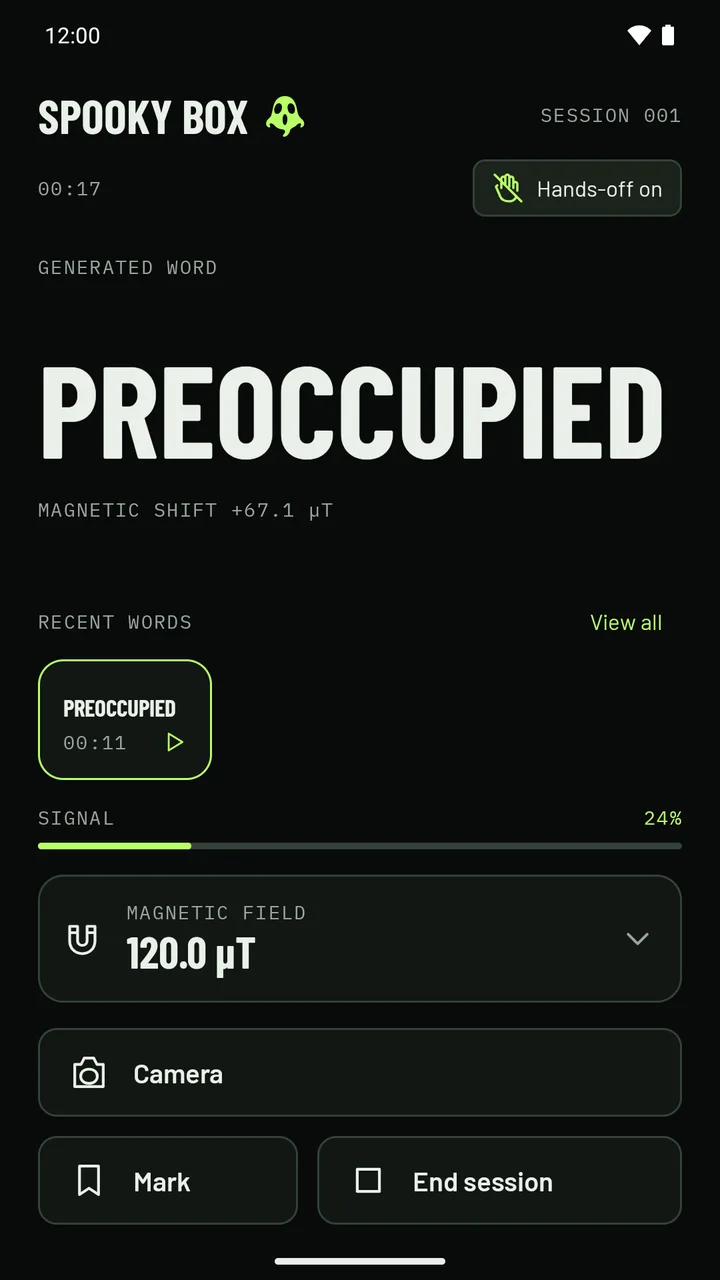
- 00:17The session clock; every word is logged with its time
- Magnetic shift +67.1 µTWhy the word came up: which reading moved
- MarkStamp a moment to find it again later
Session preview · sample data
A session, start to finish
Start the preview and watch what a session does: five seconds learning the room, then words arriving as the readings shift, each with its reason and time. Mark a moment, open the readings, then look back through the log.
 Session 012
Generated word
unsteady
Magnetic shift +8.6 µT
Recent words
- unsteady00:27
- courtyard00:21
- cold00:15
Words appear here as the session runs.
Device readings
All sensors
- Magnetic fieldAvailable48.8 µT
- MotionAvailable0.0 m/s²
- GyroscopeAvailable0.0 rad/s
- CompassAvailable212° SW
- PressureAvailable1013.3 hPa
- TemperatureAvailable21.4 °C
- HumidityAvailable41.0 %
Readings describe your device and surroundings. They do not confirm paranormal activity.
In this preview the readings are sample values, not your phone's.
How a session goes
- 01Start
- 02Learn the room
- 03A word arrives
- 04Mark
- 05Review
This is the finished sample session. Pick a word in the log to see it again.
Sample readings Not your phone
- Magnetic field
- Air pressure
- Learned baseline
- Magnetic
- 48.8 µT
- Pressure
- 1013.3 hPa
- Temperature
- 21.4 °C
- Humidity
- 41.0 %
Sample session log 00:32 · 4 words
- 00:09lanternMagnetic shift +14.2 µT
- 00:12You marked this moment
- 00:15coldPressure shift -0.4 hPa
- 00:21courtyardSpontaneous
- 00:27unsteadyMagnetic shift +8.6 µT
Words appear here as the session runs.
Pick a word or a mark to see that moment again. In the app, with a recording, it plays the room from just before it.
A website demonstration with scripted sample data. It does not read your phone's sensors, use your microphone or camera, or run any part of the app.
Included · record, film, review
Keep what the room said
Choose at the start whether to record the session as audio, or as audio and video. Mark the moments that matter, then go back to any word.
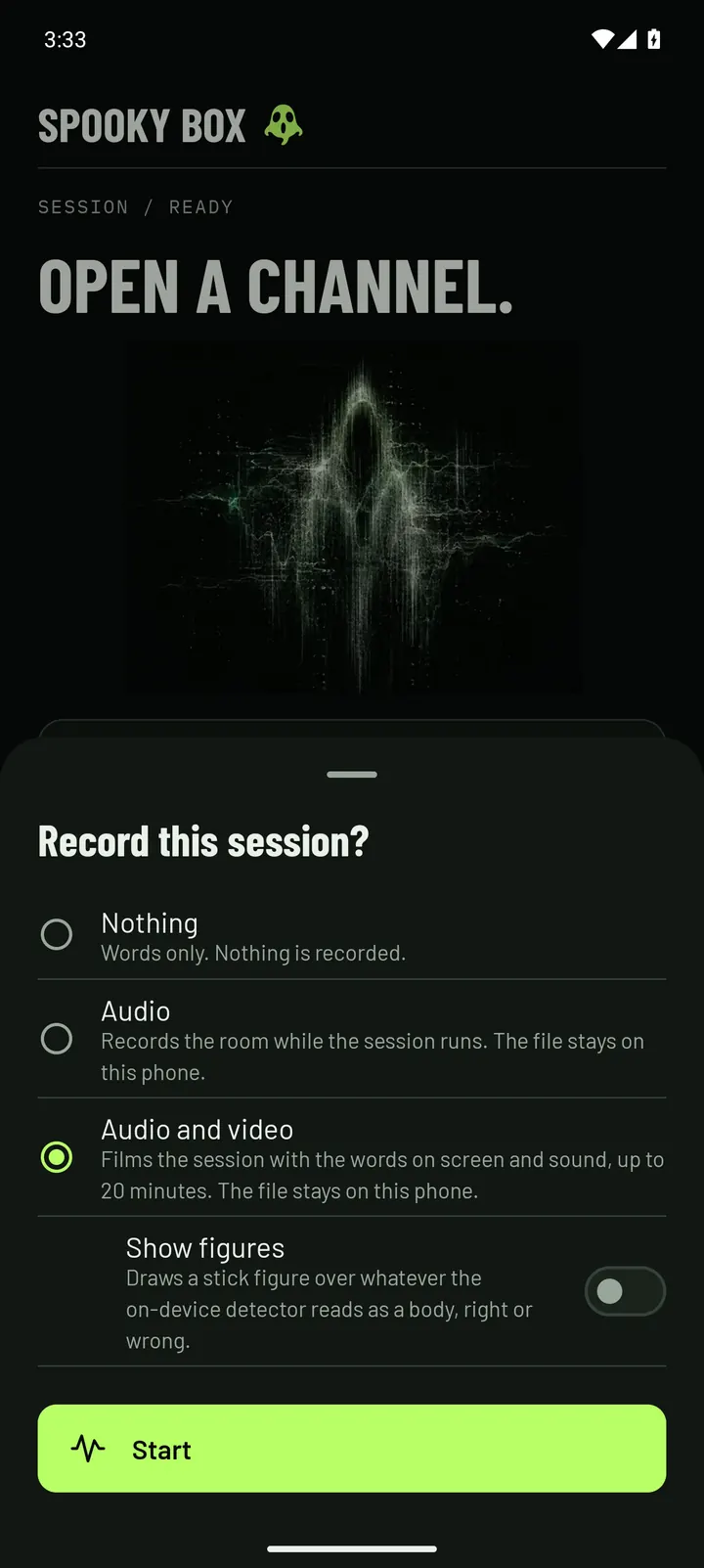
Record the room
Tap Start session and Spooky Box asks: Record this session? Choose Nothing, Audio, or Audio and video.
With Audio, the microphone keeps the whole session on your phone: your questions, the spoken words and anything else it picks up. Spooky Box remembers your choice, and Settings can stop it asking.
- Mark the moment. Tap Mark during a session to stamp a time worth going back to.
- Stays on your phone. The recording leaves it only if you share it.
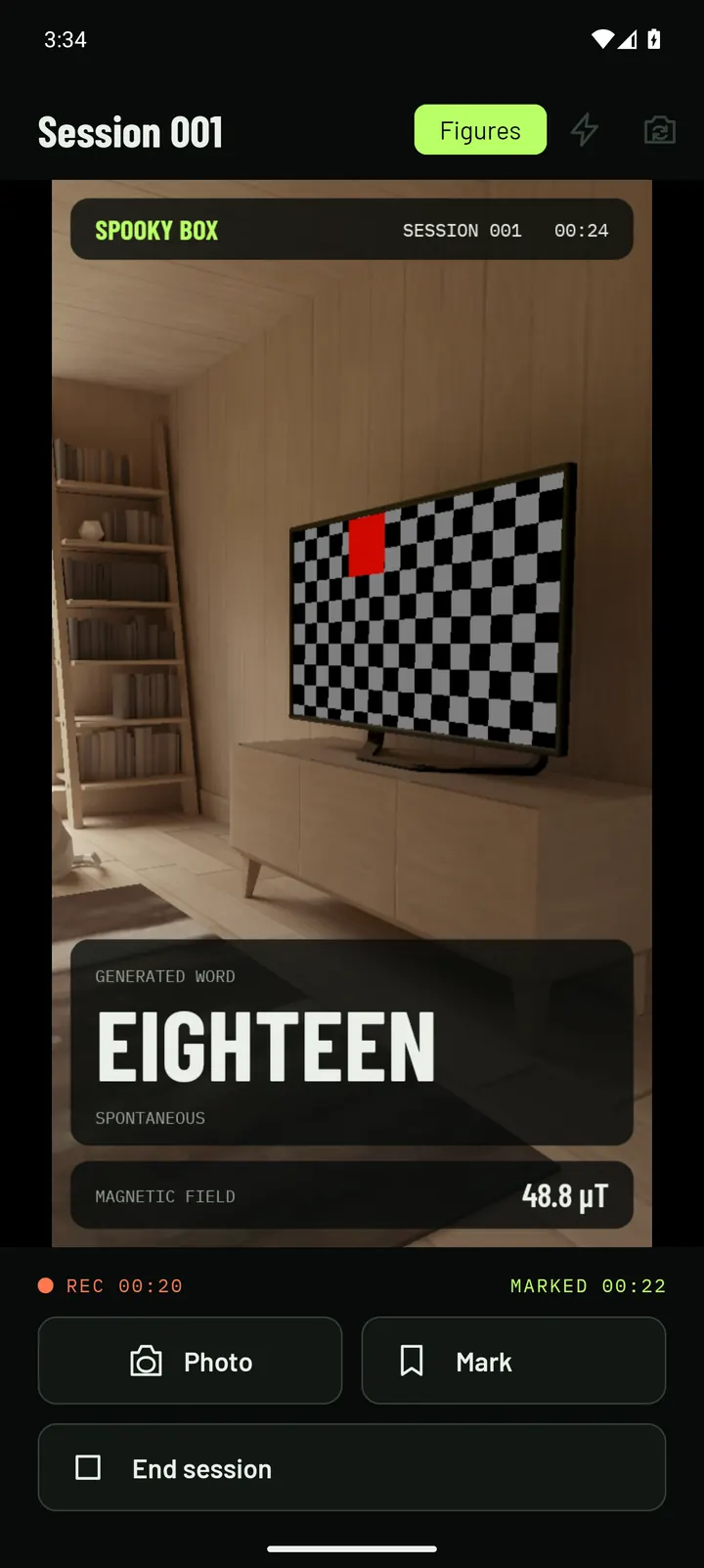
Captured on an Android emulator; its test scene stands in for a room.
Film the session
Choose Audio and video and the session runs in the camera view, filmed with sound from its first second for up to 20 minutes.
The current word, its reason, the session clock and the magnetic reading are drawn into the picture, so the video explains itself.
- Figures, if you want it. Show figures draws a stick figure over whatever an on-device body-pose model reads as a person, right or wrong. It uses no network.
- Photos and clips. In a session you are not filming, open the camera for photos and clips with the same overlay, and share them from the log.
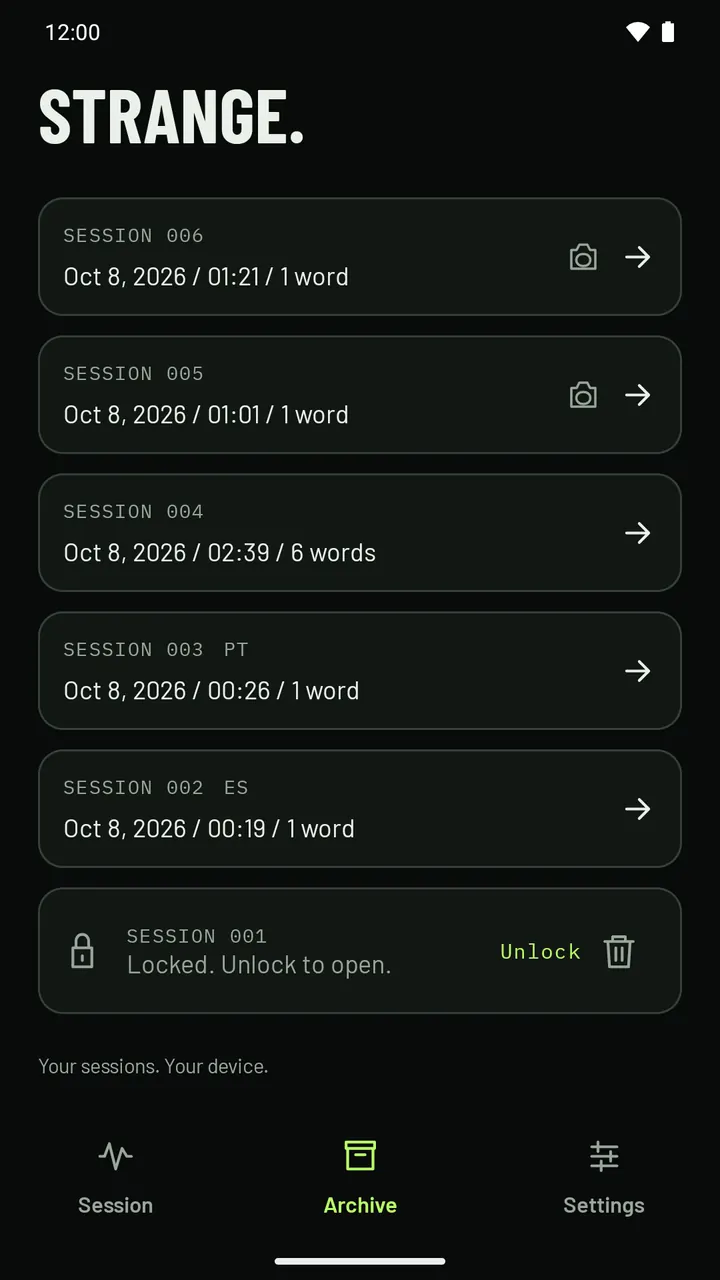
Find the moment again
Every session is saved in the archive on your phone. Its log shows each word with its time and reason, and the moments you marked between them.
With a recording, tap any word or mark to hear the room from just before it.
- Text log at no cost. Export a session's word log as a text file to share.
- Audio and video exports are part of the one-time unlock.
Also included
- Four languages
The whole app, words and voice, in English, Spanish, Portuguese and French, each bank written for its own speakers.
- Your voice settings
Pick an installed voice, its pitch and speed, and test it before you start.
- Hands-off mode
On by default: words pause while the phone is being handled.
- Hear it again
Tap a recent word during a session to hear it again.
- Live readings
Open every sensor's reading during a session.
One-time unlock
Open the full kit
Recording, filming and playback cost nothing. One purchase in the app adds five things for people who run a lot of sessions or want to share them.
US$5.99once
The app is free to download. This is the one purchase inside it, and Google Play shows the price in your currency. Not a subscription.
Every session, not just the last five
Spooky Box keeps every session on your phone. At no cost, your five most recent open; older ones stay saved, but locked. The unlock opens them all, so last month's investigation is one tap away.
Sample archive
- BasementOpen
- StairwellOpen
- Old barnOpen
- Session 009Open
- Courtyard walkOpen
- Mill house, first visitLocked
- Session 006Locked
- AtticLocked
Locked sessionFree mode opens your five most recent sessions. Unlock to open older ones. It stays saved on your phone, with all its words.
In the app
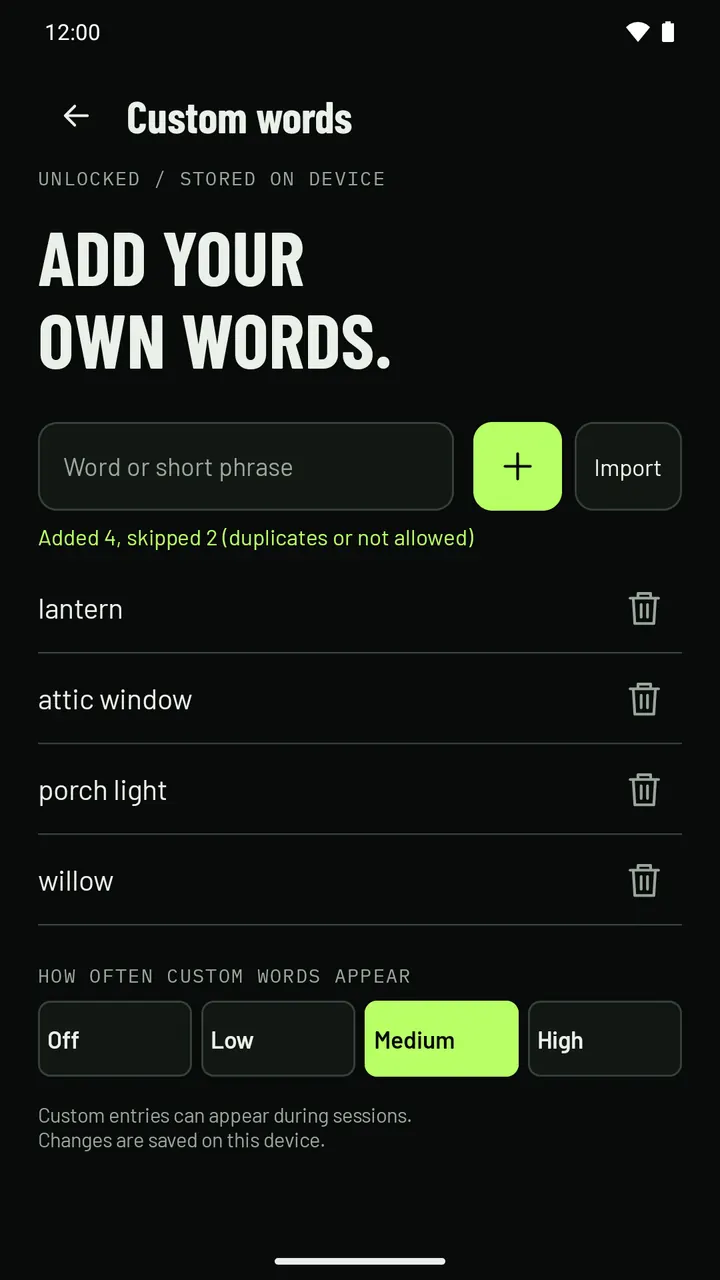
Your own words and names
Add the names, places and phrases that matter on your investigation. Type them in, or import a text file with one per line, then choose how often they come up.
Try it here · stays in this tab
How often custom words appear
Off, Low (about 1 word in 30 comes from your list), Medium (about 1 in 15, where the app starts) or High (about 1 in 8).
Which of your words comes up is random, and adding a word does not mean it will come up in a given session. A word that comes up is still a random draw. Nothing you type here is saved or sent.
In the app
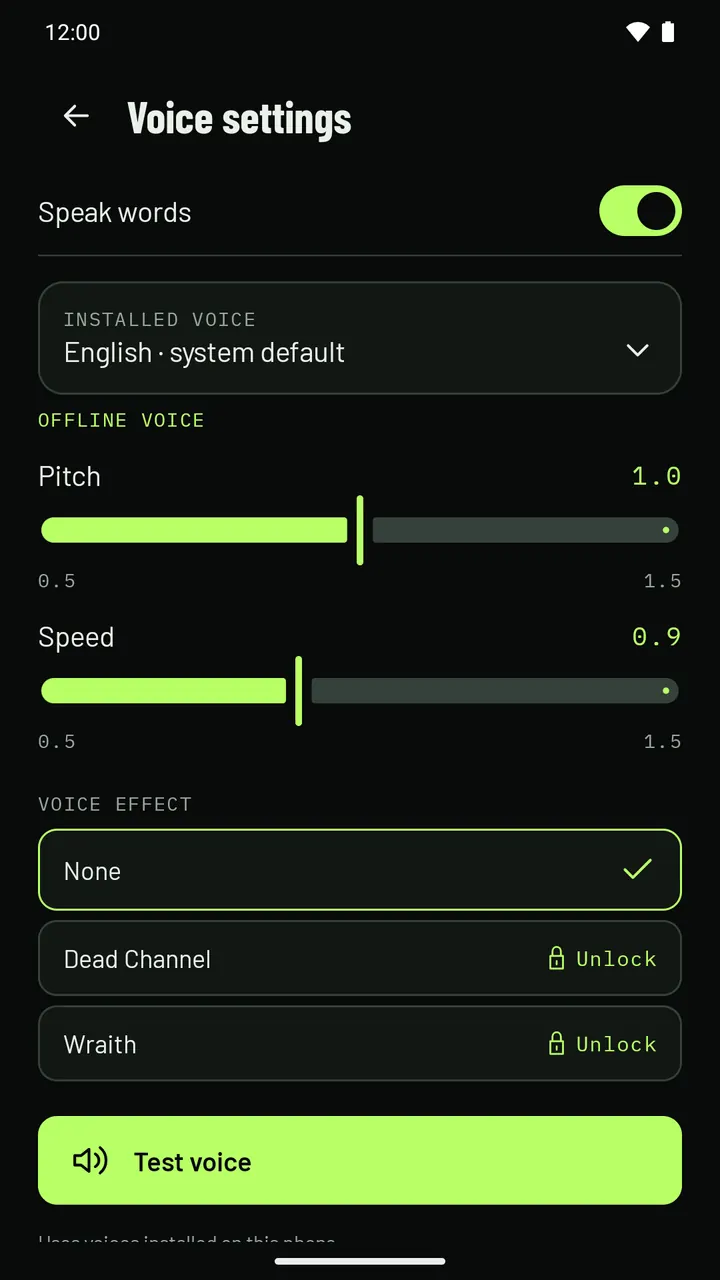
Two voice effects
Every word is spoken by a voice installed on your phone, at the pitch and speed you choose. The unlock adds two effects that change how it sounds.
Diagrams of what each effect does to the sound, not recordings. This site has no audio of the effects; you will find them in the app's Voice settings.
In the app
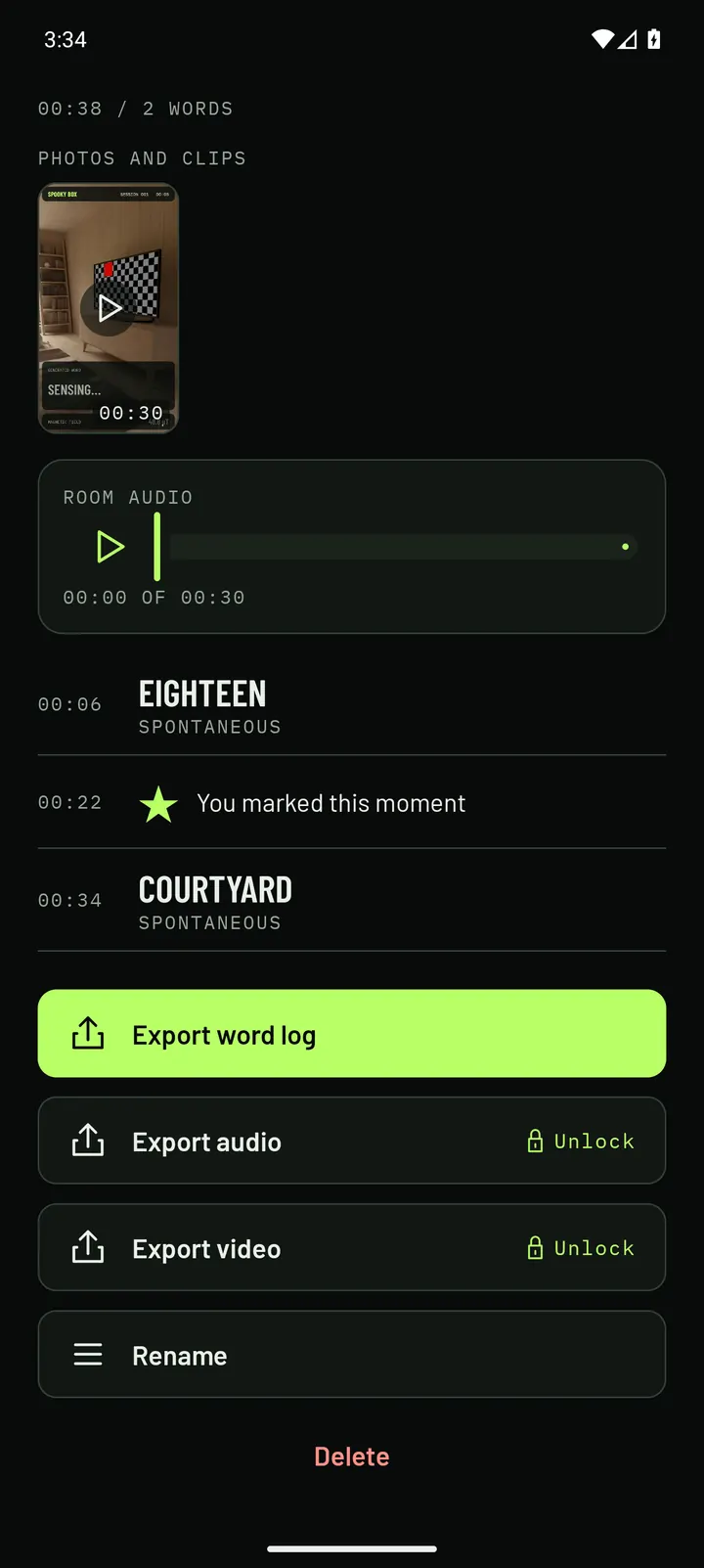
Made by Spooky Box's Export video from a sample session with four words and one mark, compressed for this page. All four words are from the app's built-in English bank. The sound is the spoken words, as that session had no room recording.
Share a session as video or audio
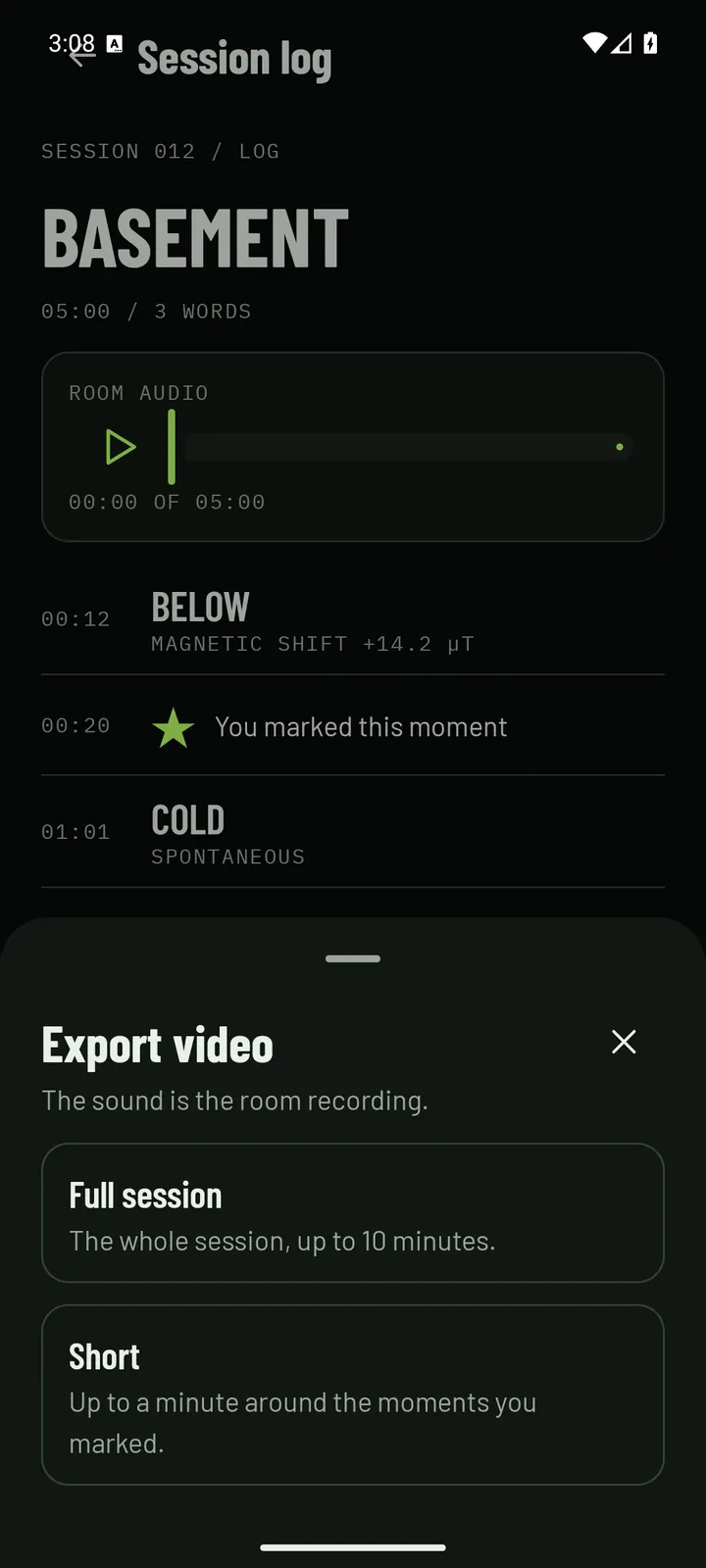
Export video shares a filmed session as it is. For any other session, Spooky Box builds a vertical 1080 × 1920 video on your phone from the words as they came up.
- Full session: the whole session, up to 10 minutes.
- Short: up to a minute around the moments you marked, or the busiest stretch of words.
- The sound is the room recording, or the spoken words where there is none. Export audio shares the room recording on its own.
Moments in the sample video · tap to jump
The session preview higher up is a website simulation. This video was made by the app's Export video, from a short sample session.
In the app
How to buy
- In Spooky Box, tap Unlock everything on Home, or tap a locked feature such as Export audio to open the Unlock screen.
- Google Play takes the payment and shows the price in your currency: US$5.99, once, not a subscription.
- Bought it before? It normally comes back by itself on a new phone. If not, tap Restore purchase in Settings.
Spooky Box is on Google Play for Android 8.0 or later. An iPhone version is coming next.
Included and the unlock
What you get
Sessions, recording, filming and playback cost nothing. The unlock is one optional purchase.
Included
No cost, no account
- Unlimited sessions: words spoken aloud from sensor activity
- Voice, pitch and speed; hands-off mode
- Live sensor readings
- Tap a recent word to hear it again
- Record a session as audio, or as audio and video (up to 20 minutes)
- Replay from any word; mark moments
- Photos and clips with the words drawn in, and sharing them
- The Figures overlay
- Every screen, word and voice in English, Spanish, Portuguese and French
- An archive with your five most recent sessions open
- Export a session's word log as text
No ads, and nothing to sign up for.
One-time unlock
US$5.99once
Everything included, plus:
- Every archived session, not just the five most recent
- Custom words and names, typed or imported from a text file
- A setting for how often custom words appear
- The Dead Channel and Wraith voice effects
- Export the audio or video of a session
Bought inside the app through Google Play, which shows the price in your currency. Not a subscription.
How it works
How it chooses a word
Your phone's sensors decide the moment. Chance decides the word.
- Learn the room
For the first five seconds of a session, Spooky Box learns the normal level of each sensor your phone has.
- Watch for shifts
After that, words arrive at unpredictable moments. A bigger shift away from normal makes the next word likely to arrive sooner.
- Draw a word
The word is drawn at random from a built-in bank of more than 3,500 words. It is not picked for its meaning, and what you make of it is yours.
Why picking the phone up doesn't count
Picking the phone up shakes every sensor, so readings taken while it is being handled are thrown out. Spooky Box measures the strength of the magnetic field, not its direction, so turning the phone is not read as a shift. Hands-off mode, on by default, pauses words until the phone is still.
Which sensors it reads
Magnetic field, motion, gyroscope, compass, pressure, temperature and humidity, as far as your phone has them. Available sensors depend on the device, and a session uses the ones it finds.
What stays on your phone
Sessions, recordings, photos and clips stay on your phone until you share them. There is no account and there are no ads. The app goes online only to check the unlock purchase, and the Figures model runs on the phone. Use an installed offline voice for sessions without a connection.
The reason shown under each word
- Magnetic shift+14.2 µT
- The strength of the magnetic field around the phone moved away from its normal level.
- Pressure shift-0.4 hPa
- The air pressure changed.
- Temperature shift
- The temperature changed, on phones that have that sensor.
- Humidity shift
- The humidity changed, on phones that have that sensor.
- Spontaneous
- No reading stood out. The word arrived by chance alone.
Built after reading 2,800+ reviews
Before writing any code we read more than 2,800 reviews in this category. Here is what people complained about, and what Spooky Box does instead.
- Words fire whenever the phone moves
Readings taken while the phone is handled are thrown out, and hands-off mode pauses words until it is still.
- It's just a random word generator
The word is random, and we say so. When it arrives is tied to the sensors, and every word shows its reason. Built-in words do not repeat within a session.
- The voice sounds wrong
Choose the voice, pitch and speed inside the app, and test it before you start.
- You have to pay to see anything
Sessions, recording and filming cost nothing. The unlock is optional and paid once.
- Session logs get lost
Every session is saved in an archive on your phone, to rename, reread and export.
A little less mystery
Does Spooky Box actually detect ghosts?
Spooky Box is paranormal entertainment. It uses device sensor activity and a word engine to create atmospheric sessions. Generated words and sensor readings do not establish the presence of spirits or verified communication.
How does Spooky Box choose a word?
Your phone's sensors decide the moment, and chance decides the word. A bigger shift away from the room's normal readings makes the next word likely to arrive sooner. The word itself is drawn at random from a built-in bank of more than 3,500 words. It is not picked for its meaning.
Is Spooky Box a spirit box?
Not in the hardware sense. A hardware spirit box, also called a ghost box, is a radio that sweeps quickly through stations. Spooky Box does not use radio. It is an app in the same tradition: it reads your phone's sensors and speaks words aloud, for entertainment.
Can I use it on a ghost hunt or a paranormal investigation?
Yes, that is what it is made for: a spirit box-style word app for ghost hunting nights and paranormal investigations, in the tradition of the ghost box and word devices investigators carry. Set it on a steady surface, start a session, ask your questions out loud, and the words that come up are logged with their time and sensor reason for you to look back on. It is paranormal entertainment, and a word is not a message from anyone.
Is the session preview on this page the app?
No. It is a website demonstration with scripted sample data. It does not read your phone's sensors, use your microphone or camera, or run any part of the app, and its words, readings and timing are the same every time. In the app they depend on your room and on chance.
Does Spooky Box have an SLS camera?
It has a Figures overlay, which is what those cameras do under the name: an on-device body-pose model draws a stick figure over whatever it reads as a person in the camera view, right or wrong, and the figure is drawn into your photos, clips and filmed sessions. We label it exactly that way in the app, we don't claim it shows anything, and it uses no network.
What does the unlock cost? Is there a subscription?
There is no subscription. Sessions, recording, filming and playing back cost nothing. One optional purchase through Google Play, US$5.99 once (Google Play shows the price in your currency), opens your older archived sessions, adds custom words and two voice effects, and lets you export the audio or a video of a session. You buy it inside the app.
Which phones does it work on?
Spooky Box is for Android phones running Android 8.0 or later. Available sensor readings depend on your device. An iPhone version is coming next.
Will it work offline?
Use a compatible installed offline Android voice for offline sessions. Downloading voices or sharing through other apps may need a connection. Your selected speech provider may have its own network requirements.
Is this safe to use on an investigation?
Stay aware of your surroundings and get permission to enter a location. Generated words are not instructions or advice for safety, health, financial, legal, or other important decisions.
Something else on your mind? Write to support@spookybox.app and a person will answer. Help with voices, sensors and purchases is on the support page.
More from Spooky Box
- A spirit box app that shows its work: how a word is chosen, and what each reading under it means.
- How spirit box apps work: the three kinds of app, and the plain truth about radio on a phone.
- Ghost hunting with a phone: what its sensors can and cannot measure, and how to run a session.
- Are ghost box apps real?: an honest answer about where the words in any of these apps come from.
- The stick-figure camera overlay: what an on-device pose model is really reading when it draws a figure.
- Haunted places: twelve buildings with a history, visiting details, and a session to run there.
Set it down.
Tune in.
Spooky Box is on Google Play. iPhone is next.
For Android phones. An iPhone version is coming next.